About the Side Bar resume design
Side Bar adds a slim colour bar beside each section heading, so short resumes look structured without any heavy decoration.
This page opens the builder with the Side Bar design selected, so you can type your own details and watch them fill the layout. All 36 designs are available in the design box and your text is kept when you switch. Compare them on the resume templates page.
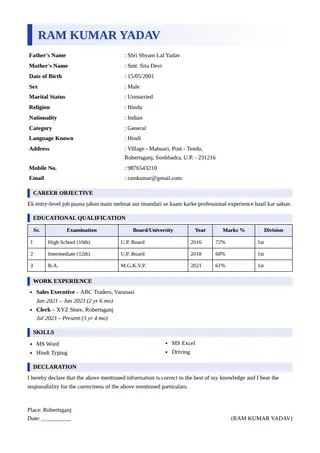
Who the Side Bar design suits
- Freshers with education, projects and skills only
- Simple professional resumes
- Candidates who want a hint of colour
When to choose another design
If the Side Bar layout does not fit your job, try a plainer option from the ATS template guide or a bolder one from the modern template page.
- Applications needing a strict black-and-white document
- Very long resumes with many headings
Design details
| Feature | In this design |
|---|---|
| Structure | Plain single column, easy for software to read |
| Photo | Works with or without a passport photo |
| Length | Built for one A4 page |
| Colours | Seven accent colours, changeable at any time |
| Other documents | The same design also applies to biodata and project front pages |
How to get the best result with Side Bar
Use the bar colour to match one accent only. Keep the rest of the text black so the layout stays calm.
Frequently asked questions
Is Side Bar good for freshers?
Yes. The accent bars make short sections look complete, and the single-column layout stays easy to read.
Does Side Bar work in black and white?
Yes. The bars turn grey and the structure remains clear.
Can I download the Side Bar template as a PDF?
Yes. Fill in your details, choose Print / PDF Save and pick Save as PDF. The file is created on your own device and no signup is needed.