About the Minimal resume design
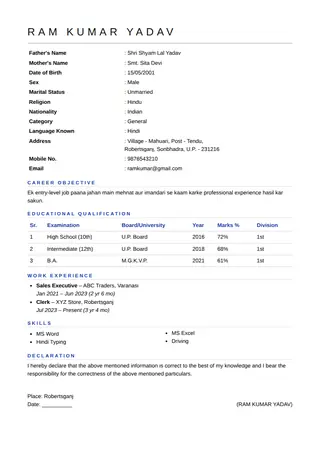
Minimal uses thin lines, a light letter-spaced heading and generous white space, with no boxes or colour blocks.
This page opens the builder with the Minimal design selected, so you can type your own details and watch them fill the layout. All 36 designs are available in the design box and your text is kept when you switch. Compare them on the resume templates page.
Who the Minimal design suits
- Developers, designers and consultants
- Anyone unsure what an employer prefers
- Resumes that rely on strong writing
When to choose another design
If the Minimal layout does not fit your job, try a plainer option from the ATS template guide or a bolder one from the modern template page.
- Candidates who want a strong visual identity
- Resumes with very little content, which may look empty
Design details
| Feature | In this design |
|---|---|
| Structure | Plain single column, easy for software to read |
| Photo | Works with or without a passport photo |
| Length | Built for one A4 page |
| Colours | Seven accent colours, changeable at any time |
| Other documents | The same design also applies to biodata and project front pages |
How to get the best result with Minimal
Minimal is unforgiving of messy text. Align dates, keep bullet points short and use real numbers for results.
Frequently asked questions
Is Minimal good for a developer resume?
Yes. The clean, light style matches the technical audience and leaves space for skills and projects.
Is Minimal good for ATS?
Its plain single-column structure reads easily, but always check that PDF text can be selected.
Can I download the Minimal template as a PDF?
Yes. Fill in your details, choose Print / PDF Save and pick Save as PDF. The file is created on your own device and no signup is needed.