An ATS-friendly resume template you can edit online
This template page uses the Classic design: a single column, bold section titles and plain text with no icons or graphics. That structure is easy for applicant tracking software to read, which is why classic layouts are the starting point for many ATS-friendly resumes.
You are not limited to one design. The builder below lets you apply the other plain layouts and change colours without retyping. For the principles behind them, read the ATS resume format guide, or see the single-design pages such as Classic and Clean Line.
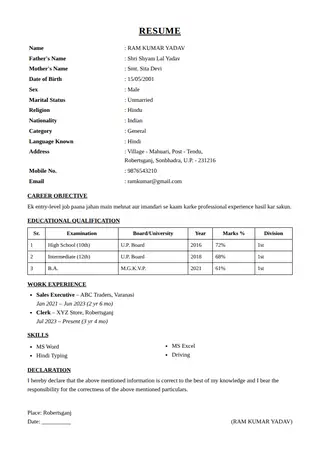
Plain designs in this builder
- Classic (1): the most traditional layout
- Clean Line (3): light rules, very readable
- Typewriter (10): monospaced, technical look
- Side Bar (13): simple left accent
- Double Rule (15): formal rules above and below
- Big Name (16): large name header
- Newspaper (20): serif with ruled headings
- Minimal (23): thin lines and spacing
Using a template without hurting readability
Keep your section titles standard, use short bullet points and avoid putting important information in the header area or images. After saving, open the PDF and try selecting the text. If you can select and copy it, software can usually read it too. No template can promise a shortlist, but a clean one removes avoidable reading errors.
Frequently asked questions
Is this ATS resume template free?
Yes. It is free, needs no signup and can be edited and downloaded as a PDF as often as you like.
Which design is the most ATS-friendly here?
Classic, Clean Line and Minimal have the simplest structure. Any design with a plain single column and selectable text is generally safe.
Can I download the template as a PDF?
Fill in your details and use Print / PDF Save, then choose Save as PDF.